Variable Machine
A localhost instrument for changing small language models on an Apple Silicon Mac: try models, change them with words, collect examples, train, blend, compare and share. Every click shows the real command it runs in a terminal at the bottom of the page.
Free and open source (MIT). It runs entirely on your own Mac: nothing you type or make is sent anywhere.
Start here
You need: a Mac with Apple Silicon (M1 or later) and 16GB of memory or more, macOS 14 or later, and about 10GB of free disk.
- Install three things (once)
- Ollama, which runs the models: download it from ollama.com and install it. You don't need to open it.
- Node 22 or newer, which runs the app: download the LTS installer from nodejs.org.
- uv, which runs training: open Terminal and paste
curl -LsSf https://astral.sh/uv/install.sh | sh - Get Variable Machine (once)
Download the zip above and unzip it, or clone it:
git clone https://github.com/studio0rpiment/variable-machineIn Terminal, go into the folder (type
cd, then drag the folder onto the Terminal window and press Return) and install what it uses:npm install && uv sync --project python - Start it (every time)
npm run devIt starts Ollama if it isn't running and opens
http://localhost:4817in your browser. To stop it, press ctrl-C in that Terminal window. - Your first ten minutes
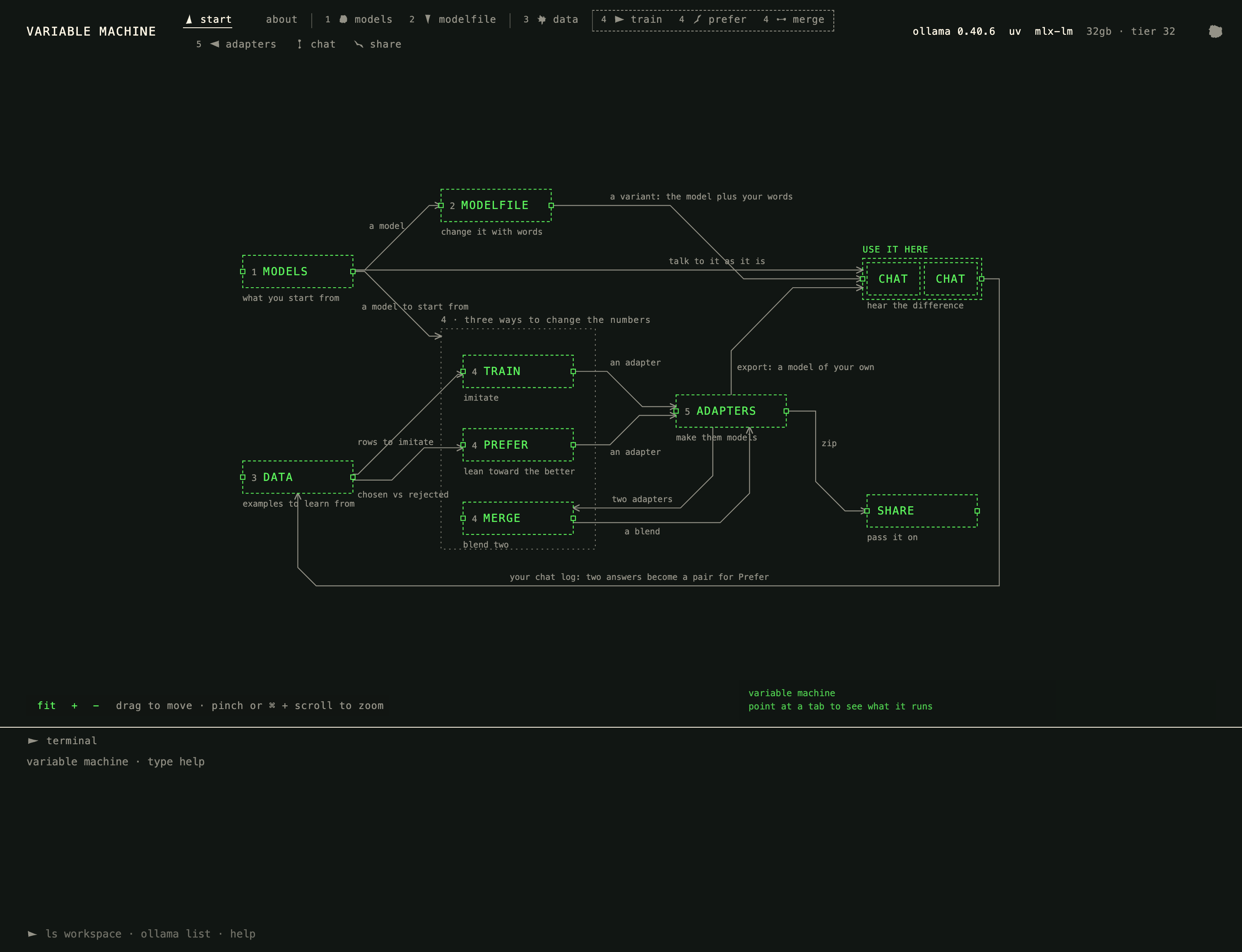
- Start shows a map of every tab and what flows between them. Click a box to open it; about has the same in words.
- Models: press
ollama pull smollm2:360mon its card (about 700MB). - Modelfile: choose a preset, press make variant, and ask the original and your variant the same question.
- Data → Train: add one of the datasets that come with the app, open Train with it, and train. When it finishes, the next step exports your model and opens Chat with it.
If something isn't right: npm run doctor checks Ollama, uv, Python and memory and says what to fix. In the app, hover over any tab name or control for a flag that explains it.
Disk: smollm2:360m is 725MB and qwen3:4b 2.5GB. The first training run downloads its base model (about 700MB for SmolLM2-360M, 3.4GB for the 1.7B).
Three ways to change a model
A language model is a large file of numbers learned from text. You can't edit those numbers by hand, but you can change what the model does:
- words
- Modelfile: standing instructions, a temperature and an example placed in front of the model. No training: the same numbers, reading a note before every question.
- examples
- Train: show it questions with the answers you want until it answers like them. Training leaves the model untouched and learns an adapter, a small set of changes.
- taste
- Prefer: show it pairs of answers, one marked better, and it leans toward the kind you chose.
- blend
- Merge: mix two adapters into a third, with a slider for how much of each.
Then Adapters turns what you made into a model of your own, Chat puts it next to the original, and Share zips it, with the record of where its data came from and its license.
The tabs
- start
- A clickable map of every tab and what one passes to the next.
- 1 models
- Four very different starters and a library to download from, each with what it was built for and its license.
- 2 modelfile
- Change a model with words, from twelve presets or your own, and hear the original and your variant answer the same question.
- 3 data
- Datasets that come with the app, any dataset on Hugging Face by name, your own file, or a table from DC Open Data or data.gov turned into questions and answers. Every dataset keeps its source and license.
- 4 train
- Imitate: LoRA training with the loss explained in plain words as it runs, and a warning before settings that won't work.
- 4 prefer
- Lean toward the better answer (DPO), from pairs you chose in Chat.
- 4 merge
- Blend two adapters.
- 5 adapters
- Export what you trained into a model, and try it on questions it never saw.
- chat
- Up to four models side by side, one question.
- share
- Zip anything you made, and unzip what someone sent you.
For teaching
The five-stage exercise takes students through words, examples and taste, then combinations, and ends with a model of their own, a model card, their work as zips and a one-minute demo.
Removing everything
For anyone who wants it all gone again (the app, everything made with it, the models, Ollama, uv, and Node if it came from nodejs.org): in Terminal, in the variable-machine folder,
bash scripts/remove-everything.shIt shows what each step removes and its size, and asks before each one. Most of it goes to the Trash, so empty the Trash to delete it for good. --dry-run only shows what it would remove.